Android App Development Using Kotlin – Complete Guide for 2026

Android app development has evolved rapidly over the past decade, and Kotlin has emerged as the preferred programming language for building modern, scalable, and high-performance Android applications. Since Google officially announced Kotlin as a first-class language for Android development, developers across the world have shifted from Java to Kotlin due to its concise syntax, improved safety features, and seamless interoperability. Today, Kotlin powers millions of applications on the Google Play Store and is widely adopted by startups, enterprises, and freelance developers.
This blog is designed as a complete learning resource for anyone who wants to master Android app development using Kotlin—from beginners taking their first step into mobile development to experienced developers looking to upgrade their skills. You will explore the architecture, tools, frameworks, advantages, real-world use cases, and future scope of Kotlin in Android development.

What is Kotlin?

Kotlin is a modern, statically typed programming language developed by JetBrains. It runs on the Java Virtual Machine (JVM) and is fully interoperable with Java. Kotlin simplifies Android development by reducing boilerplate code and providing powerful features such as null safety, coroutines for asynchronous programming, extension functions, and data classes. These features help developers write clean, maintainable, and robust applications with fewer chances of runtime crashes.
Why Kotlin for Android App Development?
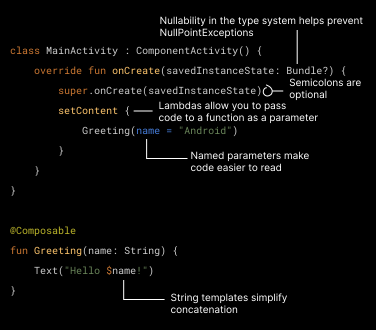
Concise and Readable Code
- Kotlin reduces the amount of code required compared to Java, making development faster and more efficient.
Null Safety
- One of the biggest advantages of Kotlin is its built-in null safety, which helps prevent NullPointerExceptions.
Coroutines for Asynchronous Programming
- Coroutines simplify background tasks like API calls and database operations without blocking the main UI thread.
Interoperability with Java
- Developers can use existing Java libraries and frameworks in Kotlin projects without rewriting the code.
Setting Up the Development Environment

To start Android app development using Kotlin, you need:
Android Studio
Kotlin Plugin (pre-installed in latest versions)
Android SDK
Emulator or physical Android device
Android Studio provides a powerful code editor, UI designer, debugger, and performance monitoring tools.
Android App Architecture Using Kotlin

MVC is a basic architecture where Model manages the data, View handles the UI, and Controller controls the app logic. It is simple and easy to implement, so it is suitable for small applications. However, in large projects the controller becomes bulky, which makes maintenance difficult.

🔹 MVP (Model – View – Presenter)
MVP improves structure by separating the business logic from the UI. The Presenter acts as a middle layer between Model and View, which makes the code more organized and easier to test. This architecture is commonly used in projects where unit testing is important.

🔹 MVVM (Model – View – ViewModel) – Recommended
MVVM is the most popular architecture in modern Android development. In this pattern, the ViewModel manages UI-related data and survives configuration changes like screen rotation. It uses components such as LiveData, ViewModel, and Data Binding, which make the app lifecycle-aware, scalable, and easier to maintain. This reduces tight coupling between UI and business logic and improves code reusability.

Modern Android Development Tools & Technologies

Jetpack Compose
- A modern UI toolkit that allows developers to build native UI using Kotlin without XML.
Firebase Integration
- Used for authentication, real-time database, cloud storage, analytics, and push notifications.
REST API Integration
- Kotlin works seamlessly with Retrofit and Ktor for consuming APIs.
Room Database
- Used for local data storage in offline applications.
Step-by-Step development Process

Planning the App Idea
Designing UI/UX
In this stage, the layout, navigation flow, colors, and user experience are designed to make the app visually appealing and easy to use.
Setting Up Project in Android Studio
Create a new project in Android Studio, choose the required template, configure dependencies, and set up the development environment.
Writing Kotlin Code
Develop the app’s functionality using Kotlin by implementing activities, fragments, business logic, and user interactions.
Integrating APIs and Database
Connect the app to external services and store data using APIs, Firebase, SQLite, or Room database.
Testing Using Emulator & Real Device
Test the application on the Android emulator and physical devices to ensure it works correctly on different screen sizes and OS versions.
Debugging and Performance Optimization
Fix errors, remove crashes, reduce loading time, and optimize memory and battery usage for better performance.
Publishing to Google Play Store
Generate a signed APK/AAB, upload it to the Play Console, add store listing details, and release the app for users.
Competitive Analysis – Top Blogs Ranking for “Android App Development Using Kotlin”
1. Android Developers (Official Documentation)
High domain authority
Technical and detailed content
Lacks beginner-friendly explanations
2. Kotlinlang.org
In-depth language features
Strong examples
Less project-based learning
3. GeeksforGeeks
Beginner-friendly tutorials
Step-by-step implementation
Limited real-world architecture explanation
4. Medium & Dev.to Blogs
Practical use cases
Developer experience based content
Less structured SEO approach
✅ Content Gap You Are Covering
Beginner → Advanced roadmap in one place
SEO-optimized structured content
Real-world development workflow
Career scope and future trends
Real-World Applications of Kotlin in Android
Kotlin is used in:
E-commerce apps
Banking & fintech apps
Social media platforms
OTT streaming apps
Healthcare applications
Food delivery apps
Companies like Google, Netflix, Uber, and Pinterest use Kotlin for Android development.
Career Opportunities in Kotlin Android Development
With the rapid growth of mobile users, the demand for Android developers is increasing every year. Kotlin developers can work as:
Android Developer
Mobile App Developer
Kotlin Backend Developer
Freelance App Developer
Software Engineer
In India, entry-level Android developers can earn ₹4–8 LPA, while experienced developers can earn ₹12–25+ LPA.
Future Scope of Kotlin in Android Development
Kotlin is not limited to Android. It is expanding into:
Kotlin Multiplatform
Web development
Backend development
Data science
This makes Kotlin a long-term career investment.
Conclusion

Android app development using Kotlin has transformed the way modern mobile applications are built. Its concise syntax, powerful features, and strong community support make it the most preferred language for Android development in 2026 and beyond. Whether you are a beginner starting your development journey or a professional aiming to build scalable and high-performance applications, learning Kotlin will open the door to endless opportunities in the mobile app industry. By mastering modern tools like Jetpack Compose, MVVM architecture, Firebase integration, and REST APIs, developers can create production-ready applications that meet industry standards and user expectations.

Comments
Post a Comment